


Badi – Rooms & Flats for rent
4.6210.00 Reviews
App Specs
- Version
- 5.132.53
- Updated On
- License
- Free
- Downloads
- 1,000,000+
- Developer
- badi
- Categories
- House & Home
- Platform
- Android, iOS
Screenshots

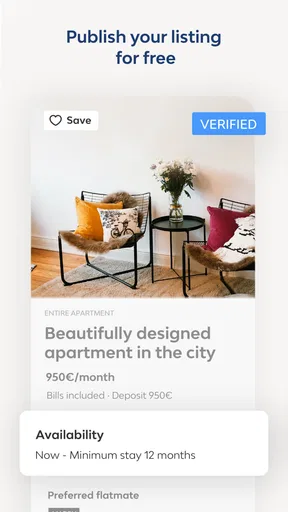


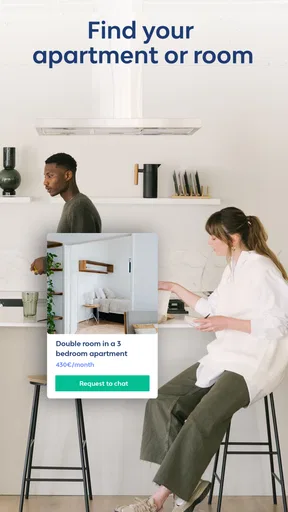

 Analysis by AppCompare
When I look for a room or apartment, I want to narrow down the options quickly, but I also need enough context to judge whether a listing suits my everyday life. Badi – Rooms & Flats for rent is a home-rental app from developer badi, aimed at people searching for rooms and places to share. Its focus on connecting renters with potential roommates makes it most useful when I’m open to living with someone, rather than simply looking for a conventional whole-apartment listing.
I’d consider it alongside local property sites, social-media groups, and general classifieds, not as a guaranteed replacement for them. Each serves a different purpose: a dedicated rental app can make browsing and contacting people feel more organized, while local groups may surface informal leads and broader property sites may suit someone focused on renting alone. My choice would depend on the kind of home I need, how soon I need it, and how much effort I’m willing to spend checking each option.
Start with the kind of home you actually need
Before opening any rental app, I find it helps to decide whether I’m looking for a room, a shared flat, or a place where I’ll live alone. That simple distinction affects how I judge every result. With a room search, the people and household routine matter alongside the location and price; for a solo apartment, the property itself is usually the main decision. Badi’s emphasis on rooms and shared living makes it a natural starting point for the first kind of search.
I’d also write down practical priorities before browsing: the areas I can realistically commute from, the move-in timing I need, and the household details I want to clarify. A map can help me assess location, but it cannot tell me whether a commute will feel manageable at the time I travel. I’d use it to shortlist neighborhoods, then check the journey separately and ask the person listing the room about day-to-day arrangements.
Where a room-focused search can be useful
The app’s roommate connection is the part I’d pay attention to if I were moving to a new city without an established circle there. A profile and an in-app conversation can give me a first impression before I arrange a viewing. That is helpful for deciding what to ask next, but I wouldn’t treat a compatible profile as proof that the household will work for me. Shared habits, expectations around guests, cleaning, and quiet hours are better discussed directly than guessed from a short introduction.
A practical approach is to use the chat to prepare for a viewing rather than trying to settle every decision in messages. I’d ask who lives in the flat, what the room includes, how shared costs are handled, and what the next step is if both sides are interested. Then I’d use an in-person or otherwise suitable viewing to check the room and common spaces. This keeps the app’s convenience in perspective: it can help open a conversation, but a rental decision still needs careful checks.
Compare the tools, not just the number of listings
Compared with browsing social groups, a dedicated app can feel less scattered: search filters, a map, profiles, chat, and matching alerts bring several parts of the search together. A social post may still be valuable when someone shares a lead in a particular neighborhood, but it can take more effort to sort through comments and follow up. General classifieds and property portals may be a better fit if I want to cast a wide net for an entire apartment. I’d use whichever channel matches the housing arrangement, and I wouldn’t assume one app contains every suitable option.
Worth Reading Before You Choose

Flipboard Shows What News Apps Must Do Beyond the Feed

Switching to Android Auto Means Rethinking Your Driving Routine

Google Calendar Makes a Crowded Week Easier to Manage

Ludo King Makes the Most of the Minutes Between Plans

Baby Panda World Brings Quick Play to Modern Phones, but Its Game Library Feels Busy

ESPN’s Live Game View Makes Following Close Games Easier
Filters are most useful when I treat them as a way to reduce noise, not as a substitute for reading each listing. If I set too many preferences at the start, I could miss a reasonable room whose description doesn’t use the exact terms I expect. I’d begin with the essentials, scan the results, and then tighten the search once I understand what is available in my target areas. That small change in workflow is especially useful when the first batch of results is either too broad or unexpectedly thin.
Use alerts without letting them rush you
Notifications can make a fast-moving search easier to manage because I don’t have to keep reopening the app just to see whether anything new has appeared. I’d turn them on when I’m actively searching, but I’d keep a short checklist nearby so a promising alert doesn’t push me into an impulsive reply. Location, move-in timing, the actual room arrangement, and household expectations are worth checking before I invest time in a conversation.
For example, imagine I’m moving for work and have a busy week. I could set my search around neighborhoods I can reach comfortably, review matching alerts during a planned break, and message only the listings that meet my basic needs. I’d keep notes on what I’ve asked each person, since several chats can quickly blur together. When a reply comes in, I can compare the answers rather than relying on memory or choosing whoever responded first.
First Impressions and Getting Started
Jumping into Badi was a breeze. The app's interface is sleek and intuitive—no more squinting at a cluttered screen trying to figure out where to tap. Signing up was straightforward, and I was quickly on my way to discovering a myriad of potential living spaces. The app offers a variety of filter options, which is a lifesaver when you know exactly what you're looking for. Need a place with a balcony or maybe a pet-friendly pad? No problem! Just set your preferences, and the app does the heavy lifting for you.
Diving Into Features
One of the standout features of Badi is its ability to connect you with potential roommates. If you’re not into living alone, this is a game-changer. You can check out profiles of other users, see their interests, and even chat with them right in the app. It’s like a dating app, but for roommates. How cool is that?
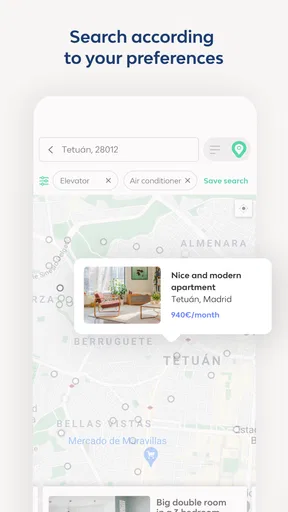
Another neat feature is the map view. I love being able to see where listings are in relation to public transport, parks, or other amenities. This makes it super easy to picture yourself in the neighborhood and plan your daily routine.
The User Experience
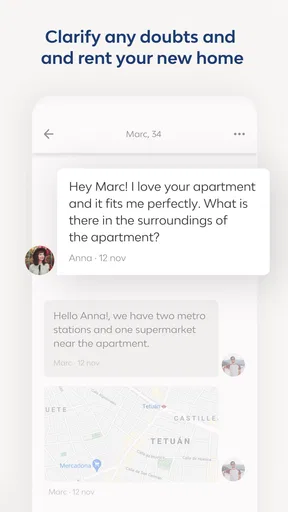
The app is not just about finding a place; it's also about ensuring you feel good about your choice. The built-in chat function lets you communicate directly with landlords or roommates, which means you can ask all those nitty-gritty questions before committing. Plus, the app’s emphasis on secure transactions gives you peace of mind. Nobody wants to deal with scams, right?
Oh, and did I mention the notifications? Badi keeps you updated with alerts whenever there’s a new listing that matches your criteria. This means less time refreshing the app and more time actually doing things you enjoy.
What to verify before choosing a room
I’d treat any listing as the start of a conversation, not as a complete picture of the rental. Before making plans, I’d confirm whether the room is still available, when it can be occupied, what costs are involved, and which spaces are shared. For a room in an occupied flat, I’d also ask who else lives there and how the household handles practical routines. Those questions help avoid the common mismatch where a room looks right on screen but the living arrangement does not.
The map is useful for understanding where a listing sits, but I’d check the exact route to the places I need to reach regularly. A neighborhood that looks close on a map may still be inconvenient depending on the route and schedule. I’d also avoid sharing sensitive personal or payment information just because a conversation feels friendly. Keep important decisions grounded in clear answers and appropriate checks, and don’t let an alert create pressure to skip them.
Who should look elsewhere, and what does it cost?
Badi is free to install, and it has a 4.5 average from around 28,000 ratings, with more than a million installs. It is rated Teen, and in-app purchases range from $5.49 to $40.99 per item. I’d check the purchase details in the app before paying for anything; the core appeal for me is the rental search and contact flow, not buying an add-on by default. The current version is 5.131.44, and it runs on Android 5.0 or later.
If I wanted a private apartment and had no interest in sharing, I’d compare Badi with broader property portals and local rental agencies rather than relying on a room-oriented search alone. Likewise, anyone who prefers to arrange everything through established local contacts may find a direct referral more comfortable. The app’s audience is clearly strongest when finding a room or exploring shared housing is part of the plan. It is less compelling if the only acceptable outcome is a specific whole-property rental that I have already defined in detail.
Switching from another search method does not mean abandoning it. I’d run Badi alongside one or two relevant local channels at first, using the same shortlist criteria so I can compare the quality of leads rather than just the volume. Once I see which source produces useful conversations, I can spend less time checking the weaker ones. That approach also reduces the risk of missing a suitable option simply because it appeared somewhere else.
The User Experience
The app is not just about finding a place; it's also about ensuring you feel good about your choice. The built-in chat function lets you communicate directly with landlords or roommates, which means you can ask all those nitty-gritty questions before committing. Plus, the app’s emphasis on secure transactions gives you peace of mind. Nobody wants to deal with scams, right?
Oh, and did I mention the notifications? Badi keeps you updated with alerts whenever there’s a new listing that matches your criteria. This means less time refreshing the app and more time actually doing things you enjoy.
My Personal Take
Honestly, using Badi felt like a breath of fresh air. Compared to other rental apps I’ve tried, this one really nails the balance between functionality and user-friendliness. The community vibe is strong here, and that’s something I appreciated a lot. Whether you're moving to a new city or just looking for a change of scenery, Badi – Rooms & Flats for rent makes the whole process feel less daunting.
If there’s one thing I’d love to see in future updates, it would be more integration with local services, like moving companies or internet providers. Imagine booking your moving van straight from the app—now that would be the cherry on top!
My Personal Take
My main reservation is that a smooth interface can make the search feel more settled than it really is. A well-presented room and a responsive chat are encouraging, but they don’t replace a viewing or clear agreement about the arrangement. I’d keep using the app as a way to discover and compare possibilities, while treating the final choice with the same care I would bring to any rental search.
The scale of the service is another reason it may be worth checking: Badi describes a community of over three million users and presents itself as a leading room and apartment rental app in Spain. That makes it especially relevant to people searching there, though a large community alone cannot guarantee that a particular neighborhood has the right room at the right moment. Availability is local, so I’d judge it by the quality of current results in the areas I need.
Wrapping It Up
In a nutshell, Badi is a solid choice for anyone in the market for a new rental. It's packed with features that make finding and connecting with your next home a seamless experience. So, if you're ready to say goodbye to rental headaches, give Badi a try. You might just find the perfect place—and maybe even a new friend to share it with.
I’d recommend it most to renters who are open to sharing and want a more structured way to discover rooms, review neighborhoods, and start conversations. For someone who needs a whole apartment, wants every arrangement handled through a local professional, or dislikes messaging prospective housemates, another route may be a better first choice. If shared housing is on your list, though, Badi is a sensible place to begin—provided you use its filters and alerts to organize the search, and make your final decision only after checking the details that matter in person.
Pros
- User-friendly interface that's easy to navigate.
- Wide range of listings in various cities.
- Secure in-app messaging for safe communication.
- Customizable search filters enhance user experience.
- Fast updates on new listings and price drops.
Cons
- Limited availability in smaller towns.
- Some features require a premium subscription.
- Occasional bugs in the app's functionality.
- Limited customer support response time.
- Some listings can be outdated or inaccurate.
FAQs for Badi – Rooms & Flats for rent
What is Badi and how does it work?
Badi is an app that connects people seeking roommates with those offering rooms for rent. Users can create detailed profiles, explore available listings, and communicate directly with potential roommates. The app uses smart algorithms to match users based on preferences and interests, streamlining the process of finding compatible living arrangements.
Is Badi available in my city or country?
Badi is widely available in many major cities across Europe, including cities like London, Barcelona, and Madrid. It is continuously expanding to more locations, so it’s advisable to check the app's availability in your specific city or country on the Badi website or app store description for the most current information.
How secure is Badi for finding a room or roommate?
Badi prioritizes user security by implementing features like profile verification, secure messaging, and user reviews. While these features enhance safety, users are encouraged to perform their own due diligence by meeting potential roommates in public places and verifying listings independently before finalizing any agreements.
Are there any costs associated with using Badi?
Downloading and using Badi is free, but there are optional premium features available for purchase. These may include features like highlighted listings or advanced search capabilities. Users can opt to enhance their experience with these premium options, but basic functionalities remain accessible at no cost.
What are the main advantages of using Badi over traditional rental methods?
Badi offers several advantages over traditional rental methods, such as a streamlined, user-friendly interface, the ability to connect directly with potential roommates, and advanced matching algorithms. The app also saves time by consolidating available listings in one place, making the search for a room or roommate more efficient than traditional methods.


